0
0
 0
0
Read Time:54 Second
First of all, you have to check the cronjob status :
systemctl status cron
after that, run this command in the shell :
crontab -e
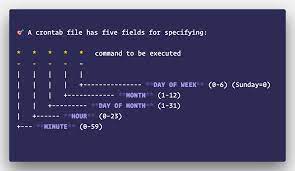
and add this line to crontab:
* * * * * /bin/bash -l -c 'date >> /tmp/cron-test.txt'
this command writes the current date every minute in the cron-test file, you can watch the crontab output with the following:
cat /tmp/cron-test.txt
you should have an output like this after 4 minutes :
Mon Mar  6 11:55:01 UTC 2023
Mon Mar  6 11:56:01 UTC 2023
Mon Mar  6 11:57:01 UTC 2023
Mon Mar  6 11:58:01 UTC 2023
now, if you can see this output your crontab works well, else you can see your log and find your issue’s reason
grep cron /var/log/syslog
done.
Using systemctl:
systemctl status cron
systemctl restart cron
Older methods:
On CentOS and other Red Hat-based systems:
service crond status
service crond stop
service crond start
On Ubuntu and other Debian-based systems:
service cron status
service cron stop
service cron start

Happy
0 %

Sad
0 %

Excited
0 %

Sleepy
0 %

Angry
0 %

Surprise
0 %